Fiber vs Wireless Internet: Which Should Your ISP Use?
Fiber vs Wireless Internet: Which Should Your ISP Use?
Fiber vs wireless internet for Kenyan ISP owners. What it costs, where each one wins, and how to start small without wasting money.
Technology
Contributor By:
Maxwell Kamau
09 Oct,2026, 8:15
Short answer first.
Fiber has the best quality and longest life but requires higher upfront investment and longer rollout time. Wireless gets you online quickly and cheaply, but requires more thoughtful planning to achieve consistent results. And most small ISP owners eventually end up using a mix of both.
What each one actually is
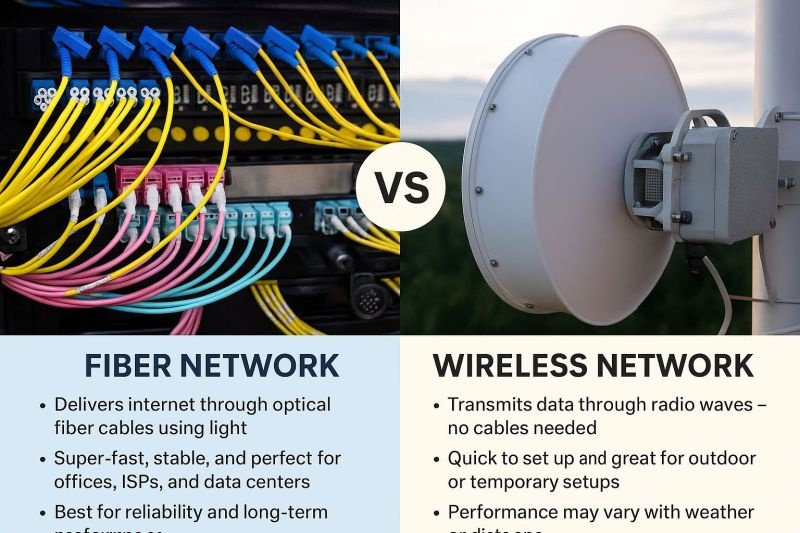
Fiber is a hair-thin filament of glass that carries light signals from one end to the other. At one end, a laser is switched on and off billions of times per second to encode the signal, and at the other end, a sensor senses the pattern of light. The signal is kept inside the filament by total internal reflection (the same principle that makes a swimming pool appear to have a glass bottom from underneath). Because of very low losses, fiber can carry signals over many kilometers before needing reboosters.
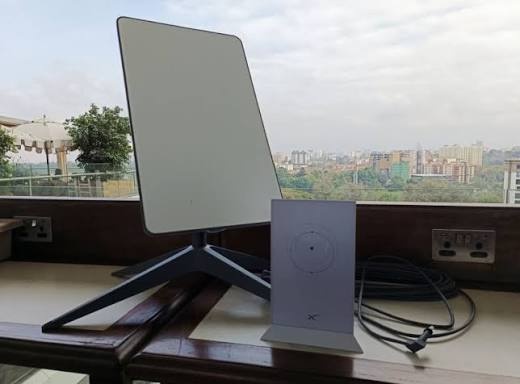
Wireless carries data as radio waves through the air. A radio at the tower sends a signal to a small rooftop receiver (called the CPE for customer premises equipment). There is no cable connecting the two, but the air is not exactly a blank slate. Radio waves must contend with all sorts of obstacles and noise on their way to the CPE.
They are both the last mile, which means that either one still needs an upstream connection to get data to the wider internet. The quality of this connection imposes a ceiling on everything beneath it.
How fiber works in practice
The fiber network consists of three components.
The OLT: An optical line terminal that is connected to the POP (point of presence) and sits at the head of the network, connecting upward to the upstream provider.
The ODN: The optical distribution network, which is the cable and splitters. Most fiber ISPs use a PON (passive optical network) architecture, in which a passive splitter divides one cable into up to 32 or 64 others (a 1:32 or 1:64 split). The passive part means there is no electronics in the splitter, which dramatically reduces costs.
The ONU or ONT: Typically a box mounted on the customer's wall, it receives the optical signal and converts it into Ethernet.
There are two main options for the physical signaling over the PON. GPON (Gigabit Passive Optical Network) offers about 2.5 Gbps downstream and 1.25 Gbps upstream per port, while XGS-PON offers 10 Gbps in both directions. The other approach to optical access is active Ethernet, in which each customer has their own fiber and powered switch.
The key technical measures are:
Attenuation: The reduction in light signal strength over distance, measured in decibels (dB). Good single-mode fiber has losses of around 0.2-0.35 dB per kilometer. The splitters and connections also add losses, with a 1:32 splitter adding around 17 dB of loss.
Optical power budget: The amount of signal loss budgeted between the OLT and the ONU. If the link budget is exceeded by the losses in the cable, splices, and splitters, the signal will not reach the ONU.
Single-mode fiber (SMF): The preferred type for ISPs. It has a much smaller core (about 9 microns) and carries a single wavelength of light, making it ideal for long-distance communication. Other types of fiber, such as multimode fiber, have a larger core and are used for shorter distances.
Splicing: Joining two fiber segments with an electric arc. A good splice introduces very little loss.
OTDR: An optical time domain reflectometer, which shines a light down a fiber and analyses the reflections. This enables a technician to find a break or bad splice to within a few meters.
The customer-facing benefits are low latency (often 1-5 ms through the last mile), and symmetrical speeds (meaning upload and download speeds are the same). Fiber is also immune from rainfall and radio interference, as well as lightning strikes on the towers, as the signal is carried in glass.
How wireless works in practice
The wireless ISP consists of a few basic elements.
Point-to-multipoint (PtMP): One tower with sector antennas provides wireless broadband to multiple customers (a "sector" being a portion of a circle). A single tower can have 60, 90, or 120-degree sector antennas, enabling it to cover an entire circle (for a total of 360 degrees).
Point-to-point (PtP): Two directional antennas face each other, establishing a point-to-point connection. ISPs use PtP links for backhauling the internet from one facility to another.
Frequency bands: The choice of frequency determines the range, speed, and interference characteristics of the wireless link:
2.4 GHz: Has good range and obstacle penetration but has only three clean channels (1, 6, and 11) and can become quite congested.
5 GHz: The workhorse frequency for WISPs (wireless ISPs). Offers more channels and greater speeds (up to around 300 Mbps), although range is slightly reduced.
24 GHz and 60 GHz: Higher frequencies that offer incredible speeds over short distances, but are easily attenuated by rain (rain fade).
Licensed bands: A regulated frequency assigned exclusively to a particular ISP. Licensed bands are much less prone to interference and are generally more expensive than their unlicensed counterparts.
Line of sight: Higher frequencies require more line of sight (LOS) between the transmitting and receiving antennas. Many WISPs also consider Fresnel zone obstructions, which are objects that obstruct the indirect line of sight between the two antennas. A link budget can be used to estimate the maximum allowable signal loss for a given link before performance will be impacted. Obstructions such as trees, hills, and buildings can degrade signal quality, but tree growth is often a bigger concern in wireless networks since it can occur gradually.
Modulation and link quality: Modern radios can use higher-order modulation schemes such as 64-QAM or 256-QAM to pack more data onto a given channel, but these require a cleaner signal to work properly. Signal quality can be measured using RSSI (received signal strength indicator) and SNR (signal-to-noise ratio). A strong signal (RSSI) with poor SNR will still perform poorly due to the impact of noise on the signal.
Protocol choice: Traditional Wi-Fi uses CSMA/CA (clear channel assessment) to avoid collisions, but this becomes problematic in long-distance applications since distant nodes cannot hear each other clearly. This results in the hidden node problem, where simultaneous transmissions from distant nodes collide. Many WISP radios use TDMA-based protocols instead. MikroTik's NV2 protocol is an example of a TDMA-based protocol that allows the base station to grant time slots to individual users.
The customer-facing benefits are deployment speed and flexibility, and performance that generally improves with distance. The primary limitations are range, interference, and contention (the number of users sharing a single antenna).
Side by side
Factor
1. Upfront cost
Fiber: High, primarily associated with laying the cable (trenching, poles, and ducts).
Wireless: Lower, primarily associated with the equipment.
2. Build time
Fiber: Longer, ranging from weeks to months.
Wireless: Shorter, ranging from days to week.
3. Speed ceiling
Fiber: Very high, limited only by electronics upgrades
Wireless: Limited by spectrum and sector capacity
4. Latency
Fiber: Very low and consistent
Wireless: Low, but can fluctuate with load condition.
5. Upload speed
Fibe: Symmetrical.
Wireless: Generally lower than download speed.
6. Weather impact
Fiber: Negligible on the signal.
Wireless: Can be impacted by rain, fog, and storms on certain frequencies.
7. Interference
Fiber: None.
Wireless: A significant concern.
8. Lifespan
Fiber: Longer lifespan for the cable (25+ years).
Wireless: Shorter lifespan for the equipment (typically 5-10 years).
9. Primary risk
Fiber: Cable damage and theft.
Wireless: Obstruction, contention, and overselling.
10. Best application
Fiber: Dense areas, estates, and businesses.
Wireless: Long tail suburban and rural areas.
Cost and deployment, honestly
The cost of fiber is primarily associated with the excavation and poles and not the glass itself. Trenching, ducting, and pole leases and permits can often exceed the cost of the cable itself and typically must be spent before you get a single customer. You will also need to spend money on splicing equipment and testing gear such as an OTDR. Deploying fiber to every home (called FTTH or fiber-to-the-home) presents huge costs that many small ISPs avoid by using FTTx variations that deploy to a box rather than straight to the house.
Wireless spends primarily on towers, radios, and antennas. A mast, a sector antenna, and a radio can be up and earning within days, and the CPE cost can fall on the customer or be recovered over a contract. The downside is that wireless networks require tuning and gear turnover is much faster.
A fair methodology to compare the two is cost per home passed (which reflects cost to make service available) and cost per connected customer (which reflects the cost to actually turn someone on). Fiber has a high cost per home passed but a low long-term running cost. Wireless has a low cost per home passed and has more maintenance. These are expressed using your own local prices, so get quotes before judging, and check local rules around permits, poles, and any wayleave requirements.
Reliability in Kenyan conditions
Here are a few real-world factors that impact the decision.
Cable damage: Roadworks, farming activity, and vandalism can cut fiber, a problem that renders a section of customers unable to connect until it can be repaired. Burying cable in duct or protected routes reduces the risk, and plan for the quick deployment of resources to address breaks.
Lightning and storms: These strike wireless masts and powered equipment with regularity. Good grounding, surge protection, and lightning arrestors are essential on any tower.
Rain: Has little effect on fiber. On 5 GHz it is mostly predictable, but higher bands can experience rain fade.
Power cuts: Both require backup power at the head end and towers. Fiber's passive splitters have no requirement in the field, which is a huge advantage.
Terrain and trees: Wireless is impeded by both. Fiber follows roads, and does not care.
The practical answer: use both
Most ISPs end up with a hybrid network in which fiber carries the heavy traffic. Fiber is used to carry the heavy volume (often on the backbone, connecting the POP to the towers), or to dense estates and business parks, with the wireless providing the last mile to scattered homes, hilltops, and pockets of rapid growth. This is sometimes called fiber to the tower, and it creates earning opportunities while fiber is rolled out in stages.
A common progression looks like this. ISPs begin with wireless to quickly reach customers and prove demand. Then they use fiber to reach the sites with greatest customer density or most severe congestion. Over time, the busiest sectors are converted from wireless to fiber, leaving the wireless to serve the less dense areas.
Billing and authentication works the same on both
Customers don't care how their connection arrives, and neither should your billing system. Customers connecting from fiber ONU and those connecting from wireless CPE will have their router authenticate with the RADIUS server. Both hotspot and PPPoE setups work with MikroTik. Fiber homes often connect as PPPoE via the ONU, while wireless customers might use PPPoE over the radio link or a hotspot login. Noch Wired handles hotspot and PPPoE billing through RADIUS with MikroTik, enabling one billing platform to handle both components of a hybrid network.
Which should you build first
Use these questions to decide:
How dense is your area? Many customers per square kilometer favor fiber. Few favors wireless. What is your budget to start? Limited capital favors wireless first. How quickly do you need to earn? Wireless gets customers paying within days. What is the terrain like? Hills and open land favor wireless. Flat, built-up estates favor fiber. What are you planning to do in five years? If you want to have high-speed packages and business offerings now, consider planning fiber routes now.
Pick your build
If you have a small budget and scattered customers, start with a solid 5 GHz wireless network, use TDMA radios (rather than plain Wi-Fi), and keep your contention ratio sensible. If you serve a dense estate or business park price a fiber run seriously, because the long-term cost per customer will pay off. If you are somewhere in between plan a hybrid from day one and design your tower sites to enable fiber access in the future.
Whichever you choose, the network only makes money when billing works. To see hotspot and PPPoE billing running on a MikroTik before you commit to a build, click Try it free on Noch Wired.
Start earning today with Noch Wired
Popular Posts