Slow Hotspot Internet? 7 Most Common Causes and Solutions for ISP Owners
Slow Hotspot Internet? 7 Most Common Causes and Solutions for ISP Owners
Your hotspot is slowing down every night and customers are complaining. Here are 7 likely reasons why it's happening and what you can do to check each one out.
Contributor By:
Maxwell Kamau
07 Oct,2026, 6:34
Why do hotspots get slow just when customers want to be online? Usually the reason is not complex and is found in one of seven places, each of which can be easily found by a few checks. Customers who complain are telling you a valuable story, and the list below shows how to read it.
Understand what do they mean by slow
Customers say the internet is slow for three different reasons, each of which has a different solution
Low throughput
Pages and videos appear slow due to low transfer speed, measured in Mbps. Remember that plans are marketed in megabits, and a smartphone downloads in megabytes, and so eight Mbps download equals about one MB per second at best.
High latency
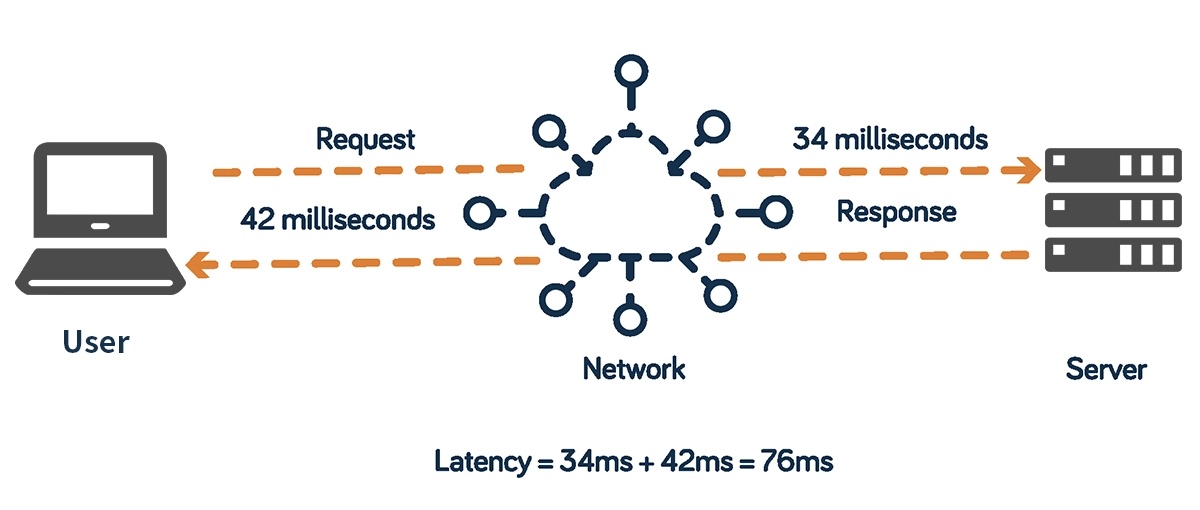
This is the pause before the first byte arrives, measured in milliseconds with Ping. Less than about 50 ms feels immediate; above 150 ms calls and games become unpleasant.
Packet loss
Packets of data are constantly being sent and received; if some packets are missing, the connection feels broken. Loss above 2 or 3 percent hurts noticeably.
Ask the customer what they mean by slow: videos buffer or calls break? The answer narrows your search.
1. Too many customers on small pipe
An ISP buys a certain amount of bandwidth, which is shared between all customers. The ratio between what is sold and what is bought is called the contention ratio. If you buy 100 Mbps and sell ten 20 Mbps plans (200 Mbps), the ratio is 2 to 1. (This is a hypothetical example.)
A moderate ratio is acceptable if customers rarely use the maximum bandwidth at the same time. Evening hours fail this test, as everyone tries to stream at once, and a high ratio crushes the internet speed during these hours. Add up all the promised speeds and compare to the available upstream bandwidth. Keep the ratio during busy hours low enough to avoid Internet slowdowns.
2. One customer eats everything
Unlimited customers who run large downloads or ultra-high-quality streams can occupy most of the bandwidth, since traffic grabbing the available bandwidth is a natural priority. Everyone else gets the crumbs.
The solution is queueing or fair share of bandwidth, done in MikroTik by simple queues or PCQ (per connection queuer). Each plan is given a maximum speed, and a burst allows pages to open faster. Another related issue is bufferbloat, when a download grabs the entire pipe, leaving everything else waiting. Pings jump from 30 ms to 500 ms or more; newer MikroTik versions have smarter queues (fq_codel) that prevent bufferbloat, and a call or game freezing every time someone downloads is a sign of this problem.
3. Bad signal and bad router location
WiFi signal strength is measured in dBm, which is negative, and -65 or higher is a good connection. At -80 or lower, speeds plummet and the device constantly lowers the transmission rate to maintain the connection.
Distance, walls, metal roofs and water tanks reduce the signal. Mount access points high and in the open, centered on the service area, keeping them away from sheet metal. A free phone app that shows signal strength will quickly show you a bad area. A wall between the customer and the access point can reduce the signal strength by more than 20 meters of open space.
4. Crowded channels and interference
WiFi shares radio space on a channel, and all devices on the same channel take turns talking. The time spent on these turns is airtime, and it is this that ultimately limits the hotspot's performance.
On the 2.4GHz band, there are only three non-overlapping channels (1,6,11) to choose from. Avoid channels in between, as they overlap with two neighbors. In a crowded environment such as an apartment building, using 20 MHz channel width is preferable; the 5 GHz band has more room and can carry more data, but has a shorter range and does not penetrate walls as well.
Older devices also add to the problem: a phone that has a very low transmission rate needs much more airtime to send the same amount of data, which slows down everything else on the channel. Some access points can block very low transmission rates and force such devices to come closer or reconnect.
5. Old or overcrowded equipment
A router's processor can only do so much. Queues, firewall rules, and thousands of connections can push the CPU to 100 percent. Packets get queued and everyone slows down, even if the Internet supply is abundant.
Look at the CPU utilization on the router's resource page during busy hours: if it is regularly above 80 percent, the hardware is too small or the rules are too complicated. Three steps are available: get a better router, offload some tasks to a second device, or reduce complexity.
Two relatively quiet problems are found here. The first is the DHCP pool, the range of addresses issued by the router to devices. If this pool is exhausted, new users cannot connect while existing ones work fine. Make the pool large enough and use shorter lease times on a busy hotspot. The second issue is that a large flat network creates too much broadcast traffic: traffic that all devices must read. Split the network or enable client isolation to reduce it.
6. Unpaid users and shared passwords
Bundle expiration may leave a user connected, but other customers can grab the same voucher on their phones. Each extra user eats up airtime and bandwidth from paying customers.
The solution is to disconnect when time or data runs out, and to restrict each voucher to a single device where possible. Our article on [stopping customers using your Wi-Fi without paying](link to article 1) contains many useful tips. Billing software that communicates with your router such as Noch Wired can automatically apply these disconnections.
7. Something wrong upstream or in the cable
Sometimes the problem is not in your network. The supplier may have congestion or an outage, or a particular cable or connector may be faulty or wet.
Test in the layers: first, test the speed at the main router, not on a customer's device, to see if your supplier is at fault. Next, try pinging a reliable address such as 8.8.8.8 and look for packet loss and fluctuating ping times. A traceroute (trace route) will show which hop has excess delay; if the jump in delay is followed by consistently high delay, that hop is the culprit. Show these results to your supplier, and they have little opportunity to argue.
A fast way to find the cause
Use a method that works from the inside out, changing one thing at a time: Ask what exactly is slow: loading, calls or both.
Check CPU utilization on the main router (moderately high).
Test the speed and ping at the router directly.
See how many customers are online, and who is using the most.
Check signal strength and channel at the customer's end.
Make sure that no unpaid user is connected.
Changing several things at once conceals the cause.
Keep a simple log
One habit pays dividends: each time the customer complains about slow internet speed, write down the time and place and what you found. After a few weeks, a pattern emerges: maybe it's always at 7pm, or always in the same development. When the time comes to manage plans, limits and cutoffs from one dashboard, click Try it free.
Popular Posts