What Is a Captive Portal and How Hotspots Use It
What Is a Captive Portal and How Hotspots Use It
You know that page that pops up when you join Wi-Fi at a cafe or an airport? That’s a captive portal, and your hotspot needs one to get paid.
Technology
Contributor By:
Maxwell Kamau
14 Oct,2026, 11:23
You have probably seen one at an airport, a hotel or a cafe. You join the Wi-Fi, nothing loads, and a page slides in demanding you to log in, agree to terms or pay for the privilege. This is a captive portal, the front door to almost every hotspot business.
What is a captive portal
A captive portal is a web page that is presented to a device connecting to a Wi-Fi network before granting it access to the internet. The network keeps the device “captive” on the portal until the customer does whatever the business wants them to do on it. The portal can ask them to log in, pay for the Wi-Fi, or accept terms and conditions. After complying with these terms, the network allows the device to surf the web.
A captive portal is not a standalone device. It is a feature of the router, which works with another server hosting the portal page. On MikroTik, it is called the Hotspot, and other systems have their own variations of the code.
How a captive portal works
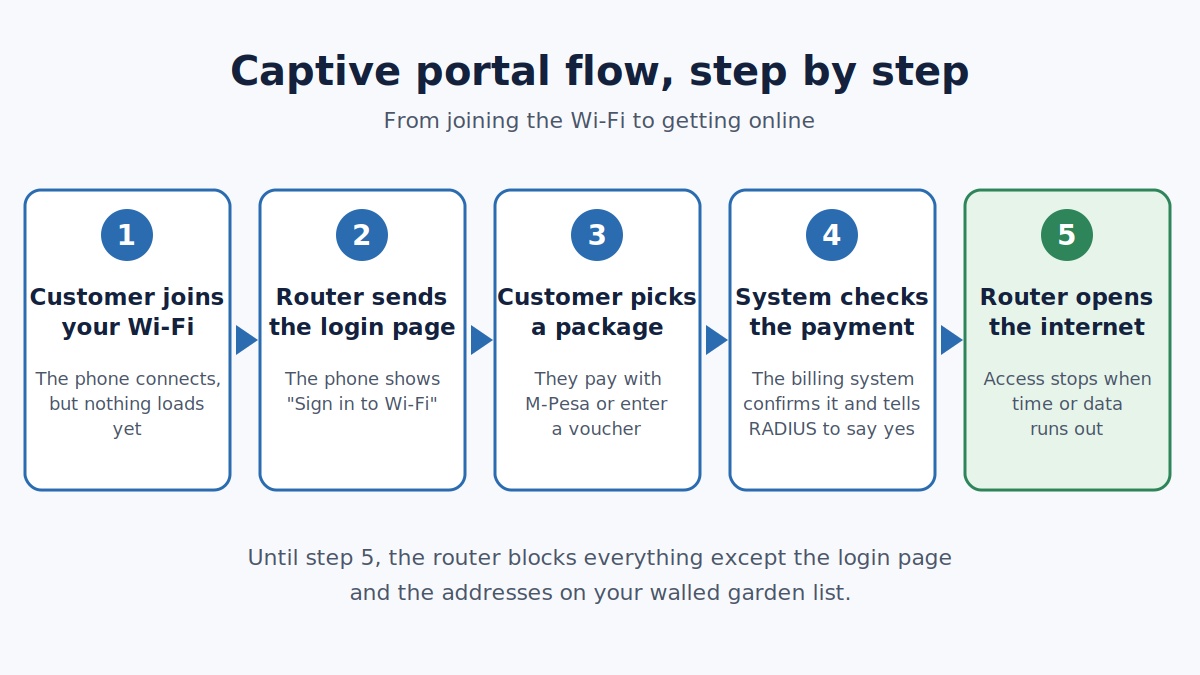
This is a technical description of the process that happens when your customer turns on their phone and sees a login page. Here is a list of the things that happen, in order.
1. The phone connects to the hotspot Wi-Fi and is assigned an IP address by the router’s DHCP server. The server also gives the phone an address of a DNS server.
2. The phone checks whether the internet is working. Every phone does this, but they do it differently. Android phones send a request to a certain URL and wait for an empty response with the code 204. iPhones do something similar but use captive.apple.com and look for the word “Success”. Windows behaves in a similar way to Android. These URLs are known as probe URLs.
3. The router sees this request and denies it because the customer has not yet logged in. The router responds by sending the customer to a portal page.
4. The phone sees an incorrect response to the probe URL. It decides that it is on a “captive portal” and displays a message saying something like “Sign in to Wi-Fi network” and the login page.
5. The customer logs in or pays for the Wi-Fi. The login page sends the customer’s information to the router or directly to the billing server.
6. The system decides whether to allow the customer on the network based on the payment or login. The router asks the RADIUS server if the customer is allowed on the network, what restrictions apply to them, and for how long.
7. The router opens a session for the customer by associating their IP address and Mac address with the session. The customer can now access the internet.
8. The accounting system tracks how much time and data the customer uses and when their session ends.
Before step 7, the customer could only access a few specific pages on the internet. This is called a “walled garden”. Here is why it is important to a hotspot business.
The walled garden
A walled garden is a list of websites and website addresses that a customer can visit while on the hotspot network before they log in. The walled garden is important because it allows the portal login page to load, as well as any other service the customer might need to reach before they can access the internet. The portal itself, therefore, has to be on the walled garden. If it is not, the customer will see either a blank page, a loading spinner, or the message “Cannot reach this page.” This is the most frequent technical problem in a new hotspot setup. Add the portal page, any billing server address, and any other address that the customer may need to the walled garden. Test it on a phone that has not connected to the network before.
Types of captive portals
There are several types of portals depending on what the customer needs to do to get on the network.
Click-through portals let the customer click a button to acknowledge the terms and conditions. They are simple but usually allow no control over the customer.
Voucher-based portals require the customer to enter a voucher code that they purchase from the business. Vouchers are popular in hotspot businesses because they can be bought in various sizes.
User-based portals ask the customer to log in with their username and password. They are common in businesses with regular customers such as monthly home or office packages.
Payment portals let the customer choose a plan and pay for it directly on the portal. A payment page may also be found on a separate link that the customer is redirected to. These are the most common in Kenyan businesses because they use M-Pesa STK push to receive payments.
Social and phone-based logins let the customer sign in with a social media account or a phone number. This can be useful for targeting customers, but extra caution has to be taken with their data.
Most Wi-Fi businesses in Kenya use voucher-based or payment-based portals, or a combination of the two, because customers are accustomed to using mobile money.
Why a hotspot needs a captive portal
Control
Without a captive portal, any device that connects to the Wi-Fi network gains free access to the internet. A portal allows the business to have control over who uses their network and for how long. The portal can only be accessed from devices that are within range of the Wi-Fi router. The portal can also give you information about the customer’s device, such as their phone model and operating system version. This helps with providing customer service.
Payment
The captive portal is the only place where the customer can pay for using the hotspot. It is the only source of revenue for a hotspot business. A portal allows the business to sell time and data and control who can use the network. Without a portal, customers can use the hotspot for free.
Limits
The portal and the RADIUS server together control how much time and data each customer can use. This ensures that a paying customer does not have their usage stolen by another customer on the same network. The portal ensures that the customer’s usage is limited to the size of the plan that they purchased.
Accountability
Each session that goes through a captive portal leaves digital footprints that can be used to track the customers. Every customer has to log in or provide some information before accessing the internet. For a hotspot business, it is important to store this information and make sure it is secure. Check Kenya’s data protection regulations to make sure your system is compliant with the law.
Your brand
A captive portal is the first thing that a customer sees when accessing the hotspot. It is also the place where they choose which plan to buy. A portal page that has the business’s name and package prices and a customer support phone number is professional and trustworthy. A portal page is often the only marketing tool that a small business has.
Marketing
A portal’s landing page can display advertisements, promotions, and contact information to every customer who views it.
Where a captive portal goes wrong
Even the best systems have some weaknesses and points of failure. Here is a list of the most common problems that a captive portal can encounter.
The portal does not appear
Sometimes, the phone does not do the automatic probe to check if the network is a captive portal. This can happen on some older phones or if the customer disables this feature in their network settings. Another reason might be the use of a DNS server that does not support the probe. A simple solution is to ask the customer to open any website that starts with http:// and not https://. Alternatively, the portal can have a short link that the customer can type in their browser.
HTTPS websites do not redirect
A captive portal can only redirect a phone to the login portal if it is trying to open an HTTP address. If the customer tries to open an HTTPS address, the browser will show an error. This is normal, and the phone will still show the portal if the customer opens an HTTP address.
A blank page
This is most likely a walled-garden issue as described above.
Customers are logged out and asked to log in again soon after logging in
This happens when a customer has a short session timeout or the phone’s Wi-Fi turns off. Once the phone reconnects to the network, it has to log in again.
Changing MAC addresses
Modern phones such as iPhones and Android phones have a private Wi-Fi address that they can change for every network they connect to. If a customer has connected to the portal before and their MAC address has changed, the portal will treat them as a new customer. Decide how the portal should react to this.
Slow pages
A customer will wait patiently for a slow portal page to load only to give up after spending a long time on it. Remember that the customer does not have any access to the internet until they have logged in, so make the portal light and fast.
Weak security
A portal that asks for a customer’s password securely is important to the trust and reputation of the business. Use strong encryption to secure the portal and prevent eavesdropping on the network. A portal that uses HTTP can be insecure, so use HTTPS and a valid certificate if possible. If your system supports challenge-based logins, use them.
Designing a portal that sells
A captive portal should be simple to use. The customer has little time and patience and is using the portal on a small screen with a weak cellular signal. Here are a few tips to design a portal that sells your plans.
Make it mobile-friendly
Most of your customers will be on phones, and very few will access it on their laptops.
Display the plans clearly
Write down the plan price, length, and speed in a way that is easy to read. Place the cheapest or most popular plan at the top.
Ask for as little as possible
Ask for a phone number and let the customer pay, or make the payment button large enough for them to see without needing to zoom in.
Make it light
Avoid using many images or videos on the portal. The smaller the page, the faster it loads.
Display a customer support number
Let the customer know who to contact if they have a problem. This builds trust in your business.
Inform the customer of what will happen next
Write down something like “You will get an M-Pesa prompt on your phone”.
Add links to your terms and conditions and a privacy policy.
How to connect a portal to a billing system
A portal on its own is just a pretty picture with words. It has to be connected to the rest of the billing system to actually do something. The simplest kind of a billing system works like this. The customer chooses a plan on the portal, and the system asks Safaricom to send an M-Pesa STK push to the customer’s phone. The customer enters their PIN, and Safaricom notifies the billing system that the customer has paid. The billing system then tells the RADIUS server to allow the customer on the network. At the end of their session, the same system closes their access to the internet.
Noch Wired is a portal and billing platform that works with MikroTik and other systems. It allows a hotspot business to sell data plans, accept payments through M-Pesa STK push Paybill, and Till, and view their customers’ plans on a dashboard. Noch Wired’s blog has several guides on setting up a MikroTik hotspot and connecting the portal to it.
Common questions we get asked everyday
Is a captive portal the same as a hotspot?
Hotspot is a general term that describes the whole system, and a captive portal is a part of it that the customer interacts with.
Can I run a hotspot without a captive portal?
Yes, but you will not be able to control who uses your network or for how long.
Why does the portal not show on some phones?
Some phones do not perform the automatic probe to detect a captive portal. Ask the customer to open a simple HTTP link.
Is a captive portal secure?
A portal can be secure if the portal page uses the HTTPS protocol and the server is well-secured. Poorly designed portals can leak customer passwords and other personal information.
Do I need technical knowledge to set up a portal?
Not necessarily, but you should follow a guide specific to your hotspot system and test the portal on a phone before customers can use it.
A five-minute test
Grab a phone that has never connected to the hotspot or ask it to “forget” the network. Connect it to the hotspot, and see if the portal shows. How long does it take to load? Can the customer see everything clearly without having to zoom in? How long does it take to choose a plan and pay? How long does it take to disconnect after the session has ended? A five-minute test can show you all the problems that a customer will encounter.
If you want to see an example of a hotspot flow, from the portal to the M-Pesa payment to being let on the internet, try Noch Wired’s demo.
Start earning today with Noch Wired
Popular Posts