Xiaomi Mi Router 4C With OpenWrt for Hotspot Billing
Xiaomi Mi Router 4C With OpenWrt for Hotspot Billing
Cheap router, big plans. We tested the idea on paper so you don’t waste money, and found where the Xiaomi Mi Router 4C runs out of steam.
Technology
Contributor By:
Maxwell Kamau
12 Oct,2026, 8:30
A KES 2500 router can offer a Wi-Fi hotspot. And it can waste your week in the process.
The Xiaomi Mi Router 4C is a budget option, finds a market in Kenya, and can be flashed with the right firmware to tie into a billing system.
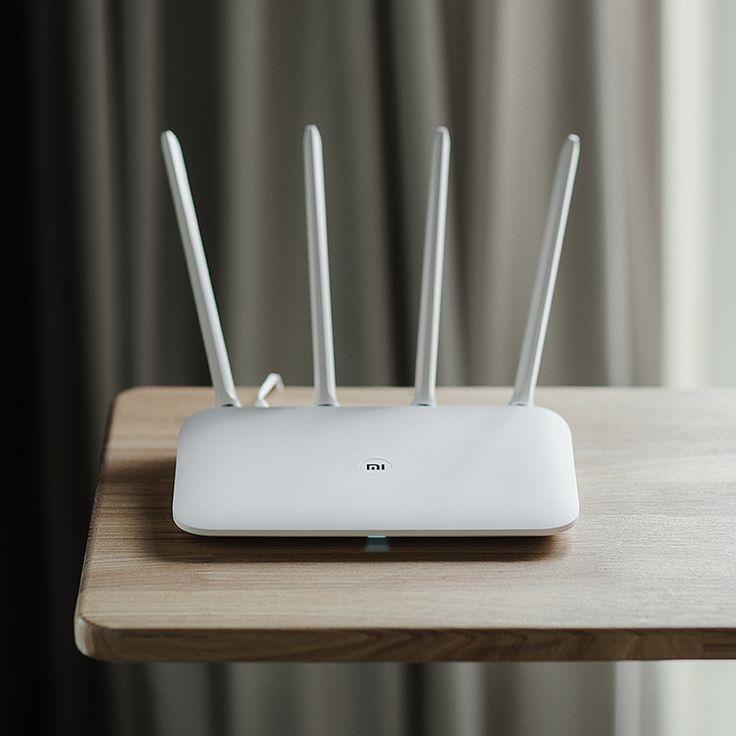
The Xiaomi Mi Router 4C: What it is
The Mi Router 4C is a mini domestic router from Xiaomi. In local shopping sites it is listed at between KES 2200 and KES 2500. It is powered by a MediaTek Mt7628 processor and 64 MB ram. 16 MB flash storage comes on board as well.
Wi-Fi is only on the 2.4 GHz spectrum, with a peak transfer rate (per spatial stream) of 300 Mbps. The router has four external antennas. On the ports you get WAN and two LAN, all 100 Mbps.
The listing promises up to 64 client connections but you will be very surprised if you try to make a hotspot with it. The 100 Mbps ports are also a limitation if you have a faster internet connection.
What OpenWrt is
As shipped, the Xiaomi Mi 4C runs Xiaomi’s custom Mi Wi-Fi ROM. It has minimal options for hotspot creation and lacks a billing integration entirely. However, there is a way to turn the Xiaomi Mi Router 4C into a proper hotspot. The OpenWrt is a Linux-based third-party firmware for routers, with an intuitive web interface called LuCI and extensive command-line utilities. The benefit of OpenWrt lies in its extreme flexibility. You can install additional packages such as a captive portal (a hotspot login page) and a RADIUS client (a tool to authenticate users against a billing server).
This gets you connected to Noch Wired billing system, which is what most hotspot providers in the region use. Noch Wired provides support for MikroTik and OpenWrt-based routers, which means in theory the Xiaomi Mi Router 4C can fit the bill. Your Noch Wired support agent will be able to help you more specifically.
What this setup is good at
There are several use cases for the Xiaomi Mi Router 4C.
A small pilot
You can try out the hotspot offering in one kiosk or shop with 10-15 registered users before investing in a more serious offering. Xiaomi Mi Router 4C will cost you less than a month of airtime for 1000 users, so failed experiments will not ruin you.
A practice device
You can use it to familiarize yourself with the entire billing process, from a user logging on to a successful M-Pesa payment to the access point opening for the client.
An access point extender
It can serve as an additional access point behind a more powerful main router, to extend coverage. Confirm with your setup that it can operate in access point mode.
What this setup is not good at
Know the limitations, which may affect your business.
A small number of clients
The number of concurrent users is limited by the router’s modest hardware. Expect roughly 10-20 people before the performance degrades noticeably, and always test before going live.
2.4 GHz spectrum
The Xiaomi Mi Router 4C only operates on the 2.4 GHz spectrum, which is more congested in urban areas with many Wi-Fi networks. Only channels 1, 6 and 11 are available with no overlap, and interference from other networks will degrade your performance. There is no 5 GHz band to offload users.
100 Mbps ports
The WAN and LAN ports on the Xiaomi Mi Router 4C are capped at 100 Mbps. This limits the bandwidth of your hotspot users to roughly that.
Not fit for outdoors
Xiaomi Mi Router 4C is a domestic router, not a cellular tower. It will stop working effectively in the rain and dusty conditions. It is best suited for an indoor environment.
Not enough storage
Only 16 MB of storage is available on the Xiaomi Mi Router 4C, which limits the number of packages you can install on OpenWrt. Each additional utility you want to install will further stress the limited storage.
Make sure to check before you buy
Not every Xiaomi Mi Router 4C can be flashed with OpenWrt. According to OpenWrt’s documentation for Xiaomi Mi Router 4C — which you should read before attempting anything — there are some units with a 16 MB flash that were reported to not work with OpenWrt. You cannot tell them apart from other units, so buy from a local reseller with a returns policy, and double-check OpenWrt’s documentation for the Xiaomi Mi Router 4C before flashing.
Flashing OpenWrt firmware is not something you do lightly. It requires technical skills, and a single mistake can brick your device. OpenWrt’s documentation for Xiaomi Mi Router 4C will guide you through the process. Remember that flashing firmware voids any warranty, and if you are not comfortable doing it yourself, you should ask a friend for help.
A rough guide for the setup
These are the very general steps for setting up Xiaomi Mi Router 4C hotspot. The exact commands and procedures are outlined in OpenWrt’s documentation for Xiaomi Mi Router 4C, as well as your Noch Wired support documentation.
1. Purchase and test: Make sure that the router can be flashed and works with your stock firmware.
2. Check flash chip and OpenWrt notes: Make sure the router can be flashed, and you know what to do.
3. Flash OpenWrt firmware: Follow the instructions for your particular device, and write down notes from the original firmware.
4. Configure network interfaces: Assign IP addresses to the WAN (internet) and LAN (local network) interfaces.
5. Configure hotspot and RADIUS: Install the packages for a captive portal and RADIUS server.
6. Configure billing: Add this device to your Noch Wired account and test a payment.
7. Test the setup: Make sure that a phone can connect to the Wi-Fi, pay, get access, and have it expire.
The most common mistake when setting up Xiaomi Mi Router 4C is configuring the walled garden — a list of IP addresses that the captive portal (hotspot login page) will let the users access before they authenticate. The most common mistake is not adding your own website or payment page to the list of allowed addresses, so the user sees a blank page.
The costs
The Xiaomi Mi Router 4C itself costs between KES 2200 and KES 2500. You can buy a short Ethernet cable and mount for another KES 3000 to KES 5000, give or take — this is my rough estimate based on local shopping sites, and not an official quote. You will also need an internet subscription and a small UPS if you live in an area with frequent power cuts. This makes the Xiaomi Mi Router 4C a cheap option to test a hotspot business, and it is attractive to those with limited budgets.
How soon can I recoup my costs?
Let’s say your expenses for a hotspot are 8000 KES per month: internet subscription, electricity, and maintenance. Let’s say you sell a day pass for 50 KES. To get to the break-even point you need to sell 160 passes per month — roughly 5 passes per day. A small pilot will help you reach this number quickly in a high-traffic area, and will turn every subsequent pass into profit. Use these figures as a guideline for your own business plan.
Other mistakes to avoid
Do not treat it as a full-time hotspot router. It is a cheap experiment, so think of it as such.
Do not skip the returns policy check. If you are not comfortable with flashing firmware and your reseller does not offer returns/refunds, it is better to walk away.
Do not sell faster plans. A single Xiaomi Mi Router 4C cannot handle more than about 20 users at a time.
Do not set it up outdoors. It will destroy it.
Do not overlook the walled garden. This is the most common technical issue with Xiaomi Mi Router 4C and OpenWrt.
Do not risk bricking your device by flashing firmware wrong. Follow the instructions to the letter.
When to graduate to something better
Upgrade to a MikroTik router when you start serving 15-20 users at a time, or want to offer faster plans. You may also need a better router if you need the 5 GHz spectrum or plan to set up a second access point. MikroTik routers are significantly more powerful than Xiaomi Mi Router 4C and can handle more traffic, making them a good choice for expanding your hotspot business. The MikroTik routers cost between KES 16000 and higher in local shopping sites. Think of Xiaomi Mi Router 4C as a way to test the waters before committing to a more serious investment in your hotspot venture.
Are you a good fit for this solution?
The Xiaomi Mi Router 4C is a good fit if your budget is tight (under KES 20000), you expect a small number of users, and you have technical expertise to flash it. It is not a good fit if you plan to scale rapidly, operate outdoors, and do not have technical expertise. Either way, it is a good idea to test the billing before you buy more. The 4C is a viable option for a home network that is within a small area, has a small user base of less than ten people, and has someone experienced with flashing hardware components. The 4C is not a good option for people with high-traffic websites, people who need internet access outdoors, and people without technical expertise in hardware components.
Before purchasing the 4C, it is important that you test how billing works to avoid extra expenses. To test billing, use the 4C on Noch Wired as a free trial, add the new router to the account, and make a test payment to check the process.
Start earning today with Noch Wired
Popular Posts