How to Lower Late Payment Rates Through WhatsApp Reminders
How to Lower Late Payment Rates Through WhatsApp Reminders
Most people who pay late have simply forgotten. They are not trying to avoid paying. A friendly WhatsApp reminder at the right time can help bring in those end-of-month payments without anyone having to call and follow up.
Billing and Payments
Contributor By:
Kamau
06 Nov,2026, 10:35
The end of the month can be tight for customers. Salary might arrive late, rent and school fees are due, and the Wi-Fi bill can easily slip their mind. A late payment doesn’t always mean someone is trying to dodge the bill. Maybe they forgot, planned to pay the next day, or weren’t sure when it was due.
A reminder at the right time can help. WhatsApp is a good option because so many people check it throughout the day.
Customers may forget the due date or be unsure when they need to pay. They might plan to pay after their salary comes in, only to find it is delayed. And when paying takes a few steps, it’s easy to put it off until tomorrow, then the day after. Before long, their internet is cut off, and they’re frustrated.
For your business, following up can mean calling or messaging customers one at a time. That takes time, and chasing an unpaid bill can feel awkward.
By the end of the day, everyone can be worn out. A frustrating experience might even push a customer to leave.
Automatic reminders can’t fix every payment issue, but they can help with a common one: forgetting. They can also make follow-ups feel friendlier and less stressful.
Set up automatic payment reminders
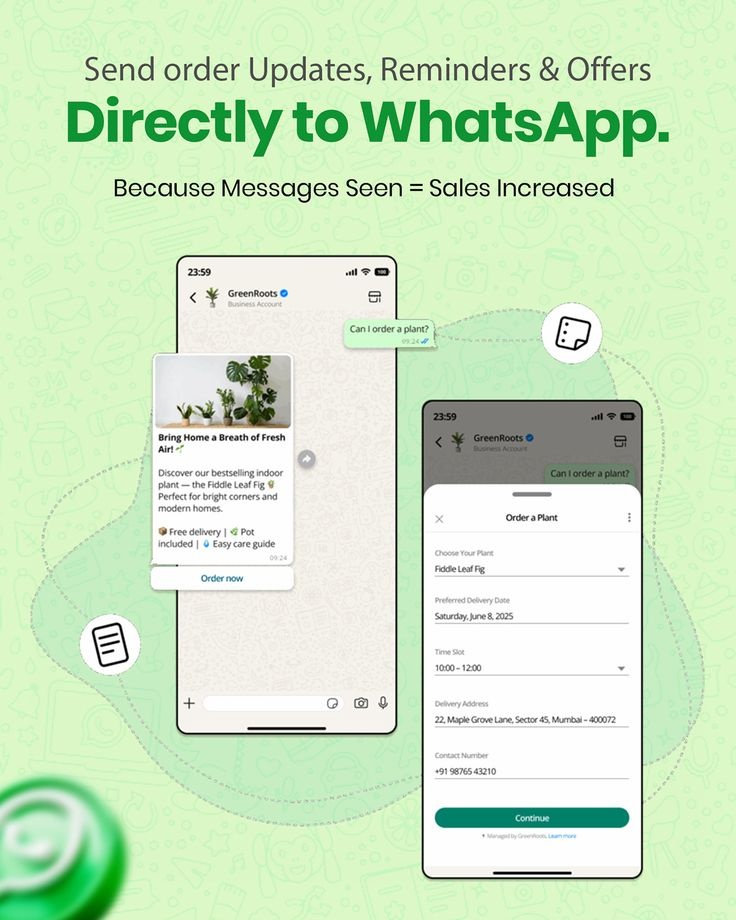
Your billing system should have each customer’s plan, balance, and due date. Use that information to send a short WhatsApp message at the right time.
A simple schedule might look like this:
1. A few days before the due date: Let the customer know their payment is coming up.
2. On the due date: Remind them that payment is due today.
3. After the due date: If they haven’t paid, send a friendly follow-up with instructions on what to do next.
Include the customer’s name, the amount they owe, the due date, and how to pay. You could also add a phone number in case they have questions. Make paying easy by including your Paybill or Till details, a payment link, or a prompt.
Once a customer pays, your system should confirm the payment, send a thank-you message, and stop the reminders. That way, customers who have already paid won’t keep getting messages, and your team won’t need to switch off reminders by hand.
You can do the same for hotspot customers. If someone gets a message saying their pass expires in an hour, they have time to top up before their internet cuts out. You might also make a sale you would otherwise have missed.
WhatsApp has a few advantages over SMS. Customers can see who sent the message, read it, and reply with questions. The messages can feel more personal, which may make people more likely to respond. SMS is still a useful backup for customers who don’t use WhatsApp.
What to know about WhatsApp automation
Automated WhatsApp messages work differently from messages sent in a regular chat. The free WhatsApp Business app doesn’t support bulk automated messaging. Businesses usually use the WhatsApp Business Platform, connected to their billing system or a messaging provider.
A few things to keep in mind:
- Get permission first. Ask customers when they sign up if they are happy to receive WhatsApp messages, and keep a record of their consent.
- Use approved templates to start conversations. If you message a customer first rather than replying to them, you’ll need a template approved by WhatsApp.
- Choose the right message category. Payment reminders are generally treated as utility messages because they’re about a customer’s account.
- Keep reminders focused on the bill. Promotions and other marketing messages may cost more and have stricter rules. Stick to payment details in your reminders.
Costs
Meta, the company behind WhatsApp, charges for each template message it delivers. The price depends on the message type and the country.
Factor reminder messages into your monthly costs and work out how many you plan to send. SMS might be cheaper, or it might cost more.
Keep customer information safe. Phone numbers are personal data, so protect them, use them only for the purpose customers agreed to, and follow Kenya’s data protection rules. If people report your messages as spam, WhatsApp could restrict your account. Keep messages short, friendly, and relevant to the bill.
Before turning on automatic reminders, test them by sending a few to your own phone. Check that the name, amount, date, and payment details are correct. If something is wrong, the same mistake could be sent to everyone.
Keep track of how well the reminders work. How many customers pay within a few days? How many still need a phone call? If the messages aren’t helping people pay, try changing the wording or timing.
The goal isn’t to scare people into paying. It’s to give busy customers a friendly reminder at the right time, with everything they need to make a payment. Do that consistently, and month-end may stop feeling like something to dread. Most of the money might simply come in on its own.
Start earning today with Noch Wired
Popular Posts