Is Automatic M-Pesa Billing Worth It for a Hotspot?
Is Automatic M-Pesa Billing Worth It for a Hotspot?
Hotspot will be losing money because of issues such as a slow activation process, duplicate codes and fraud. An automatic billing system can help overcome these issues.
Billing and Payments
Contributor By:
Maxwell Kamau
28 Oct,2026, 9:31
Hotspots typically don’t lose money in a huge way but are losing it in little leaks.
Customers will pay and wait for a long time (10 mins), and codes will get shared between multiple people (5).
Payment messages will be fake.
Time will be wasted looking at payments instead of selling.
Automatic billing will not make your customers use more internet, but it will stop these leaks and save you time. Let’s look at how this will help you and how much you can realistically expect to earn from it.
Losses using manual payments
Let us say we have a hotspot and we sell 40 passes a day. With an average price of KES 35, this means we should be earning KES 1400 a day, or KES 42,000 a month.
Delays whilst activating. This will cause you to lose sales. You’ll receive an M-Pesa payment, then have to search for the payment, ensure the correct amount was paid, and activate the customer. Some customers will wait for 5 minutes, some an hour. Some will give up and request a refund or simply walk away. Let’s say we’re losing 2 passes a day. This equals KES 70 a day or KES 2100 a month.
Unpaid usage. Passes will not end or get used across 3 devices. Let’s say we’re losing 3 passes a day. This is KES 105 a day or KES 3150 a month.
Incorrect Payments. Customers may send the wrong amount, pay from a friend's phone, or send a screenshot that has been edited. Due to someone being tired, they’ll let a few through. Let’s say we’re losing 1 pass a day. This is KES 35 a day or KES 1050 a month.
This means we’re losing around KES 6300 a month; this is around 15% of our earnings. These are just examples; you may lose less or more. The main thing to note here is that most of the losses aren’t huge issues but are small things.
Time. If you spend 2 hours a day reconciling payments and replying to messages. This is around 60 hours a month. You’ll know what your time is worth, but it will determine if you can run a second site.
How Automated Billing Works
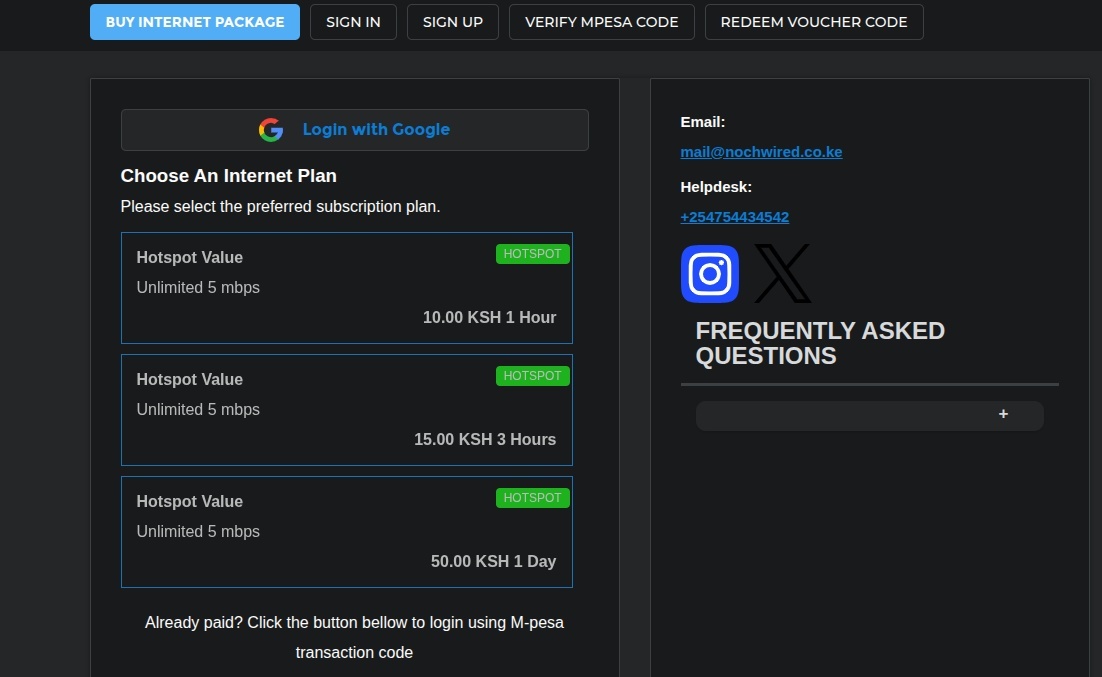
When a customer connects to your Wi-Fi, they will be taken to a login screen. They select a pass and enter their phone number. The billing system will ask Safaricom to send them a payment prompt (STK Push). They enter their PIN (only visible to Safaricom). Safaricom will send us a confirmation (callback) to let us know they have paid. The system will match this to the customer and notify the router to allow access. It will also start the timer. Once the time runs out, the system will block access.
Every step in this process helps to prevent the losses above. Activation only takes seconds, so no one will be waiting. The system will ensure sessions end on time and can be limited to 1 device per voucher. This will reduce unpaid usage. As the confirmation is coming directly from Safaricom, you will not be able to be tricked with a fake screenshot.
There is no need for you to reconcile payments, as it is automatic. If your plans have reminders, customers who forget will receive a message letting them know they’re about to run out. This will bring some customers back.
Noch Wired has STK push, Paybill, Till, Hotspot and PPPoE billing. It also has a free trial and customer portal.
Where you will really earn and where you won’t
Using the example above, if we only stop half of the KES 6300 loss, we will be saving KES 3000 a month. Whilst this is a good amount, it isn’t going to multiply your earnings.
Some vendors will claim that their systems have reduced revenue loss to under 5%, increased payment speed by 70%, or increased revenue by 45%. They don’t explain how these figures are calculated, so take them with a pinch of salt. How much you’ll save depends on how much you were losing. The only way to find out is to measure.
There will be costs involved too. The billing system will charge you a fee. You will have to pay for SMS reminders. You will still have to pay M-Pesa fees for your till or paybill. The real amount you will save will be after these costs. If the cost of the system is less than the losses you’re preventing and the time you’re saving, you’ll be making a profit. If you’re not losing much, you may not be.
The areas you will see the most improvements in are:
Customers will purchase more, as payments are quick (10 seconds) and no typing is required. The shop is open at 2am when you’re not there. You won’t lose sales based on you being there. Regular customers will return due to the reminders and top-ups. You will have clean data showing you what packages are popular, what times are busy, and what customers are returning.
This will help you set prices and packages based on facts. You will gain back time. This is the biggest gain. It will determine if you can manage a second site. Usually a second site on the same internet line will earn you more than any tricks you can do with billing on the first.
Things to Note
Automated billing uses a chain, meaning it can fail. If you don’t receive a confirmation from Safaricom, you may lose sales, as the customer has paid but received nothing. A good system will let you track and fix these payments. You’ll know why they failed. Ensure you test the whole process before going live. Put your support number on the login screen. Regularly check the unmatched payments list. As you have customers' phone numbers, make sure they are secure and you’re following Kenya’s data protection rules.
Measure First
You won’t know how much automated billing will help until you have a base. For two weeks, write down a few simple stats. How many passes you sold, how much money you earned, how many customers complained about waiting, how many devices were online during the busiest hour compared to how many vouchers you sold, and roughly how much time you spent on payments.
Switch one site to automated billing. Do the same for another two weeks. Compare the results. If sales, complaints, and time have improved, you now know how much it will help you based on your data.
To set up automated billing:
Pick a till or paybill. Read our guide to see which will best suit your customers. Connect the billing system to your router. Set up your packages with the time, data, and speed limits. Ensure all vouchers or accounts have the correct rules. Send a test payment from your phone. Let the pass run out and ensure you’re blocking access on time. Add reminders for regular customers. Add your support number on the login screen. Monitor closely during the first week and fix any issues.
Set up your base this week. Even if you’re unsure if you want to switch, you will learn more about your hotspot in two weeks than any article. You will also know if it is worth paying for. If it is, Noch Wired has a free trial. Simply connect your router and try a test payment.
Start earning today with Noch Wired
Popular Posts